Convert an image to an embroidery file
Drop in a picture and get back an editable design: fills for the areas, satin for the edges, run stitches for the fine lines. Nothing is uploaded, and the first ten are free.
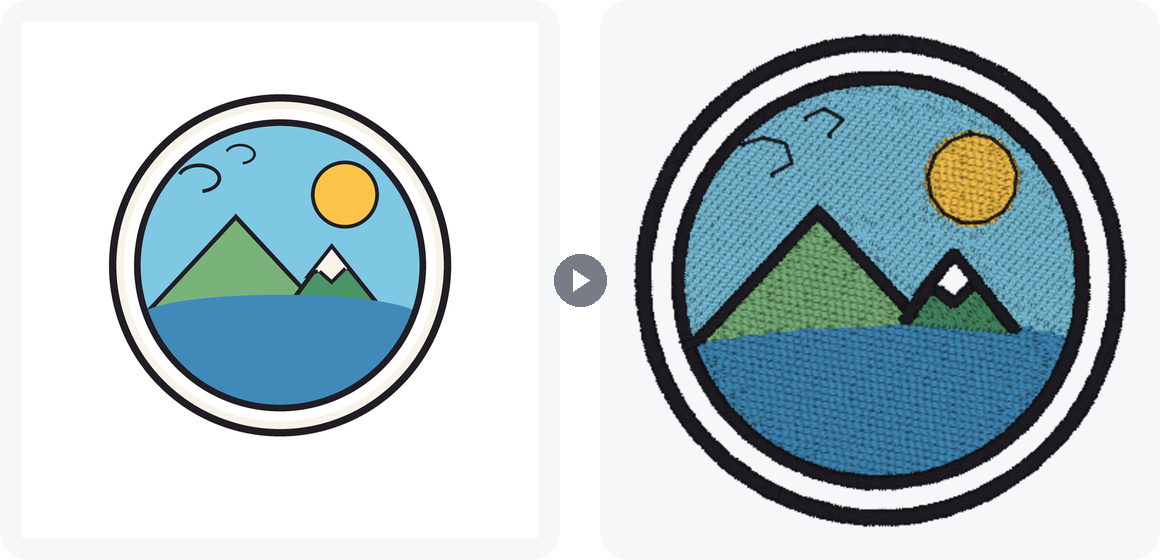
What you get back
Not a picture of stitches. Real objects, each one editable.
Fills for the areas
Tatami rows cover each colour region, angled and dense enough to sew cleanly.
Satin for edges and narrow shapes
Outlines, arcs and bars become satin columns with underlay, one per stretch.
Run stitches for fine lines
Lines too thin for a zigzag are sewn along their centre, tripled so they read bold.
How it works
- Drop the picture. PNG, JPG or WebP. It is read in your browser and never leaves it.
- Set the size and convert. Convert at the size you will sew, because every decision depends on real millimetres.
- Edit and export. Open it in the editor, change anything, and export DST, PES, JEF, EXP or VP3.
- 10 free conversions
- Private converted in your browser
- 10 export formats
- Any operating system
Good to know
Three things that decide how well a picture converts.
Flat artwork converts best
Logos, badges and clip art are already made of the shapes thread can hold. A rough result usually means the picture was not, rather than that the conversion failed.
Size changes the answer
An outline that is a run stitch at 60 mm is a satin column at 100 mm. Convert at the size you will sew.
Hairlines merge
A line thinner than the picture's own edge blur disappears into its neighbour. Thicken it first.
Want the full picture? How the digitizer decides, what to check before you sew, and what it cannot do, in the guide. Read the auto-digitize guide
Other free tools
- Embroidery file converter Open a DST, PES, JEF, VP3 or thirty other machine formats and export the one your machine reads.
- Embroidery digitizing studio The full editor: draw with run, satin and fill tools, set lettering, check it in true view, and export what your machine reads.
Common questions
Can I convert a JPG or PNG to an embroidery file for free?
Yes. Ten conversions are free on any StitchConsole account, with no card, and exporting the result to DST, PES, JEF, EXP or VP3 is free as well. A conversion is only counted when you import the result onto the canvas.
The result looks rough. Did the conversion fail?
Almost certainly not. Auto-digitizing reads the flat shapes in a picture, so it needs a picture made with embroidery in mind: a few solid colours, clean edges, no gradients or photographic detail. A snapshot from a phone gallery has none of those, and no software turns one into clean embroidery automatically, the professional desktop packages included. Give it artwork drawn for stitching, or simplify the picture first, and the same tool gives a clean result.
Will the embroidery design look exactly like my image?
It will look like a stitched version of it. Thread cannot hold a gradient, a soft edge or a hairline, so flat shapes come through faithfully and photographic detail does not. Flat vector-style artwork is what converts well.
Can I convert a photo to an embroidery file?
Not usefully, and no automatic tool can. A photograph has no flat colour regions to trace, so what comes back is noise. Posterise or trace the photo into flat shapes first, or use it as a backdrop and draw over it by hand.
What size should I convert at?
The size you intend to sew. Every decision the digitizer makes depends on real millimetres, so a shape that becomes a satin column at 80 mm may become a fill at 200 mm. Scaling a finished design afterwards changes its density and its pull.
Which file does my machine need?
Brother, Babylock and most Bernina home machines read PES; Janome reads JEF; Husqvarna Viking reads VP3; Melco reads EXP; nearly every commercial machine reads DST. Those five and five more (PEC, XXX, U01, TBF, PMV) are all free to export.
Do I need to install anything?
No. It runs in the browser on Windows, macOS, Linux and ChromeOS. There is no installer and no plugin to configure.